
Roobet review · IN · 2026
Roobet app: download APK for Android and iOS
 Author: Christian Rees
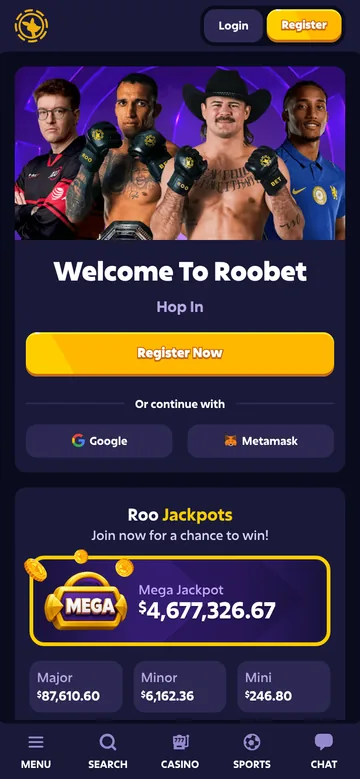
You don’t need a Roobet APK to play on your phone. Open Roobet in the mobile browser and the lot is there: Casino, Roobet Originals, Live Casino and Sportsbook. On Android or iPhone you can pin a shortcut to the home screen, which gets you back to the site in one tap without any installation file.
Is there a Roobet app?
Not in the sense most people mean. When I tested the site from India, I used it purely in a phone browser, and the mobile version is the same lobby you get on a computer. So if you’ve been searching for a Roobet app download, browser access is where you actually start. Open the site, log in and get on with it.
It helps to separate three things. A mobile website runs inside your browser. A shortcut is just an icon that opens that website. A native app is a separate piece of software you install. A shortcut on your home screen looks like an app, but it isn’t one, and it says nothing about whether an Android or iOS release exists.
APK files are Android installation packages, full stop. They have nothing to do with iPhones. Adding Roobet to an iPhone’s home screen installs no APK, and saving an icon on Android doesn’t call for one either. That keeps things simple, since there is no file to pick, update or worry about.
What Roobet really offers is what sits behind the login, not a file on your handset. The site says it has over 7,000 games, with Roobet Originals, Live Casino and Sportsbook on top. Roo Jackpots and the VIP Club are separate sections again, and worth a look once you’ve seen the main lobby.
In short
Be wary of any third-party file sold as a Roobet app download APK. Keep the official address visible in your browser and treat the website as the only starting point. Our Roobet login and sign-up guide covers account access, so you can go straight from setup to the games.
Using Roobet on mobile without a Roobet APK
On a phone the site loads in the browser and behaves much like the desktop version. The layout is the same lobby, with a bottom navigation bar for Menu, Search, Casino, Sports and Chat, and Login and Register along the top. It’s easy enough to use one-handed.
You may also hear the term progressive web app, or PWA. That’s a website with app-like extras, sometimes including browser-managed installation. Having a home-screen icon doesn’t prove every one of those features is switched on, so think of the icon as a quick way to open Roobet and nothing more.
Casino games and Roobet Originals on your phone
The casino lobby draws on big names such as Pragmatic Play, Play’n GO, Hacksaw Gaming and NetEnt. If you already know which studio you like, filter by provider. If not, the Popular and New Games sections are a quicker way in than scrolling thousands of tiles.
Roobet Originals live in their own section next to the wider catalogue, which makes them easy to find. Searching for a Roobet game download might suggest you need separate installers per section, but you don’t. Start on the website and browse from there. Our guide to Roobet slots, live casino and originals will help you decide where to begin.
Live Casino, Sportsbook and promotions
Live Casino is a different feel from slots. Evolution is among the listed providers, and the section is split into Game Shows, Roulette, Blackjack and Baccarat. Sportsbook is a separate menu entry. All of it opens in the mobile browser.
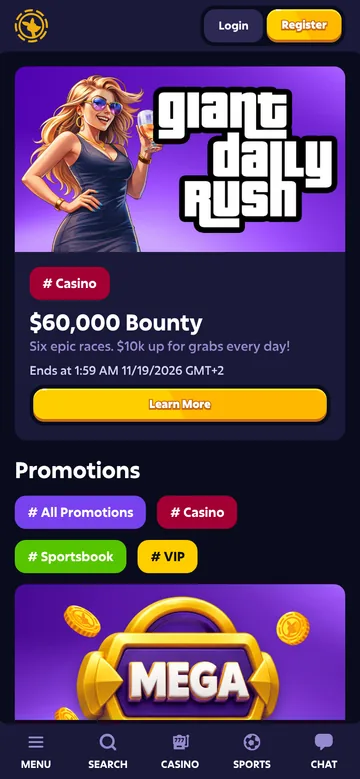
The Promotions page has filter tabs for All Promotions, Casino, Sportsbook and VIP, and when I looked there was a time-limited daily campaign banner at the top. Roo Jackpots, the VIP Club and Refer & Earn each have their own entry, and there’s a Redeem section for codes. Offers change, so read the Roobet bonus and promotions guide to see how the terms work after sign-up.
Roo Jackpots is the odd one out: it has its own section rather than sitting among the regular games. It’s worth a glance, and it costs you nothing in setup.
Payments through the mobile website
Look through the payment section on its own before you decide how you’d pay, rather than mixing it in with browser setup.
The cashier lists a range of cryptocurrencies as well as a Cash (fiat) option, though what you see can depend on your country and account, so check it after logging in. Before sending anything, look at minimum amounts, fees and processing times, and for crypto make sure you choose the correct network. Keep the two jobs apart: the browser gets you in, the cashier handles money. The Roobet deposit and withdrawal guide goes through the listed methods and how the process works.
How to add Roobet to the home screen on iOS and Android
A home-screen icon saves you typing the address every time. It sits with your other shortcuts and opens the site directly. Everything is done through your browser’s own menu, so no APK is involved.
Welcome offer for new players
Open your Roobet account in a couple of minutes and check the current offer.
Add Roobet to an Android home screen
Most Android browsers can save a site to the home screen, though the wording and menu position vary by browser and handset. Open Roobet first in the browser you normally use, so the shortcut points at the right page.
- Open Roobet in your Android browser and confirm the website address.
- Open the browser menu and look for an option such as Add to Home screen.
- Follow the prompt and pick a name you’ll recognise.
- Go back to your home screen and tap the new icon.
Some browsers show an Install option instead. Read the prompt before you accept. That kind of browser-managed install is a different thing from grabbing an APK off a file-hosting page. And if neither option appears, a bookmark does the job just as well.
Add Roobet to an iPhone home screen
On iPhone, Safari is the straightforward route. You get an icon without hunting for an Android package. Load the site in Safari before you open the sharing controls.
- Visit Roobet in Safari and check the address of the open page.
- Open Safari’s Share menu.
- Choose Add to Home Screen and review the shortcut name.
- Confirm, then use the new icon to return to the site.
Menu placement shifts a little between iOS versions, so if you can’t spot Add to Home Screen straight away, scroll further down the Share sheet. If you’d rather stay inside Safari, a bookmark works too. Either way you end up on the same website, so choose whichever is quicker for you.
Keep your mobile access straightforward
Give the icon a name you’ll spot quickly. Keep your browser up to date, and don’t treat a random download page as part of the process. The icon opens the website. It won’t log you in for you, and it doesn’t give you offline casino play.
Save the page you actually use, not a promotional landing page. Switch browsers and you’ll need to make the shortcut again. Once it’s set up, log in and have a look around the sections.
Roobet app vs desktop: which experience suits you?
It comes down to screen size and habit. On desktop, the left sidebar lists the main sections in one place, including Casino, Sportsbook, Roo Jackpots, Promotions and Refer & Earn. On a phone you reach the same things through the bottom bar. No app download is required for either.
| Access method | Setup | Main benefit | Key distinction |
|---|---|---|---|
| Android browser | Open the website | Access from your handset | No APK needed for browser access |
| iPhone browser | Open the website in Safari | Access without an Android package | APK files are not iOS installers |
| Home-screen shortcut | Save the site using browser controls | A convenient icon for returning | A shortcut is not proof of a native app |
| Desktop browser | Open the website on a computer | More space for browsing | Uses a desktop screen rather than a handset |
A bigger screen is kinder when you’re comparing game thumbnails or reading the fine print on a promotion. A phone wins when you just want to dip in. Neither choice changes which sections you can use, so go with whichever fits the session you have in mind.
A shortcut is a habit, not a different product. You get the same Casino, Roobet Originals, Live Casino, Sportsbook and Roo Jackpots either way. If the loyalty side interests you, read our Roobet VIP programme guide before deciding what to focus on.
In short
My advice: use desktop when you want room to browse, and your phone when you want speed. Pin the icon or just bookmark the site. Then register or log in, and skip the installation file altogether.
Roobet apk: FAQ
Do I need a Roobet APK download to play on Android?
No. An Android browser is enough. Open the website, log in and browse the sections. For quicker return visits, save a bookmark or use your browser’s home-screen option. Neither one asks you to download an installation package from a separate file page.
How does Roobet app download work on an iPhone?
It doesn’t need an APK. Open the site in Safari, then use Share and Add to Home Screen if you want an icon. APK files belong to Android, not iOS. The icon gives you easy access to the website, but it doesn’t mean you’ve installed a native iPhone app.
What does Roobet download APK latest version mean?
It’s what people type when they want an up-to-date Android installation file. For browser access you can skip that search, because you open the website rather than pick a version. A home-screen shortcut just points back to the site, so there’s no package version to choose or keep updated.
Does a Roobet home-screen shortcut work offline?
No. The shortcut makes the site quicker to open, but you still need an internet connection to use Roobet. If the connection drops, restore it and reopen the page. Saving an icon doesn’t download games for offline use.
Do I need a separate Roobet game download APK?
No. Go to the website and use Casino, Roobet Originals, Live Casino and Sportsbook from there, instead of looking for separate game packages. The mobile browser is the way in. Bookmark the site or add a home-screen shortcut if you want an easy way back.